-
Pan India Delivery.
-
100% Tested.
-
Secure Payments.
-
1 Lakh+ Order Delivered.

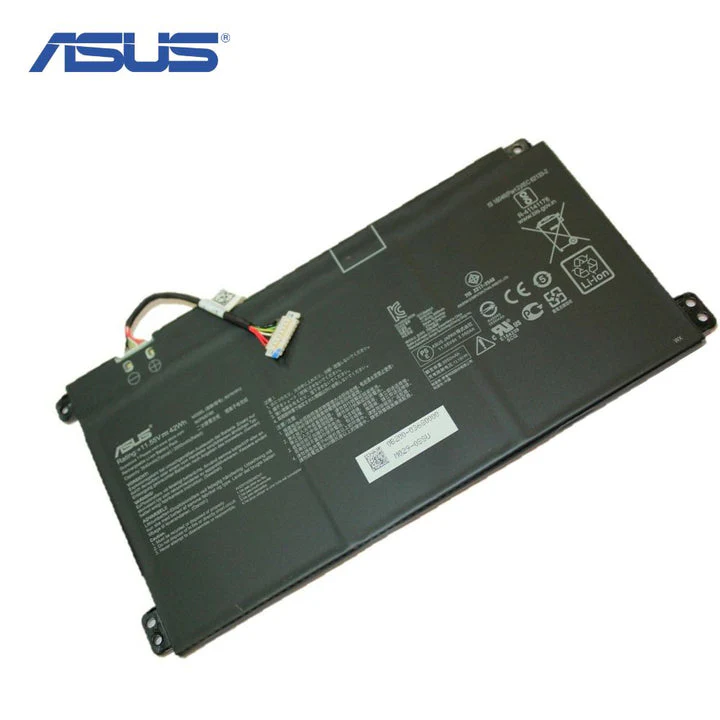
B31 N1912 C31 N1912 Battery, specifically designed for compatibility with ASUS 14 15 E410 M, E410 MA, L410 MA, E410 KA, E510 KA, E510 MA, R429 MA, E410 MA-BV1312 WS, E510 MA-EJ614, and F414 MA-EK1890 WS Series laptops. Provides reliable power for your device.
Get 100 Discount On Online Payment USED PROMO CODE
ONLINE100
₹5,999.00 Original price was: ₹5,999.00.₹2,848.00Current price is: ₹2,848.00. 18% GST Included
Payment Methods:
| Warranty | 1 Year Warranty |
|---|
Restore Your Laptop’s Freedom with the High-Performance B31N1912 Replacement Battery
Bring your ASUS laptop back to life with our premium replacement B31N1912 / C31N1912 battery. Designed specifically for a wide range of ASUS 14 and 15 series laptops, this battery is the perfect solution for a system that no longer holds a charge or has a significantly reduced runtime. Engineered with high-grade materials and advanced safety features, it restores your device’s portability and ensures you can work, study, or stream without being tethered to a power outlet. Invest in reliability and give your laptop the power it needs to keep up with your demanding lifestyle.
Key Features:
Unlock Uninterrupted Productivity and Entertainment
A failing battery can severely limit your productivity and turn your portable laptop into a desktop. Our replacement battery empowers you to reclaim your freedom. Experience the convenience of working from a coffee shop, attending lectures without searching for a power socket, or enjoying movies on a long flight. This battery is not just a component; it’s an upgrade that enhances your laptop’s usability and value, ensuring consistent and dependable power whenever and wherever you need it.
Technical Specifications:
Full List of Compatible Part Numbers:
To ensure a correct purchase, please verify that your laptop’s original battery part number matches one of the following:
Full List of Compatible Laptop Models:
This battery is compatible with, but not limited to, the following ASUS laptop models:
Installation and Care Instructions:
To maximize the performance and lifespan of your new battery, we recommend the following steps. First, upon installation, discharge the new battery to 10% and then charge it fully to 100%. Repeat this cycle 2-3 times to fully activate and calibrate the battery cells. For daily use, avoid letting the battery drain completely to 0%. It is also advisable to avoid exposure to extreme temperatures (hot or cold) and to store the battery in a cool, dry place if the laptop will not be used for an extended period.
You must be logged in to post a review.
No account yet?
Create an Account
Reviews
Clear filtersThere are no reviews yet.